
Manufacturing companies work hard to produce safe, reliable, and high-quality products. Whether the business manufactures pharmaceuticals, medical devices, cosmetics, food products, automotive parts, or electronics, maintaining consistent quality is one of the biggest challenges. Even a small production mistake can lead to customer complaints, product recalls, financial losses, or regulatory penalties.
This is where CAPA Management Software becomes an essential part of modern manufacturing.
Corrective and Preventive Action (CAPA) is more than fixing problems after they occur. It is a structured quality management process that helps manufacturers identify the root cause of issues, correct existing problems, and prevent similar issues from happening again.
Traditionally, many organizations managed CAPA using spreadsheets, emails, and paper records. While this method may work for small businesses, it becomes difficult to track actions, approvals, deadlines, and regulatory documentation as operations grow. Missing a single step can result in compliance risks and quality failures.
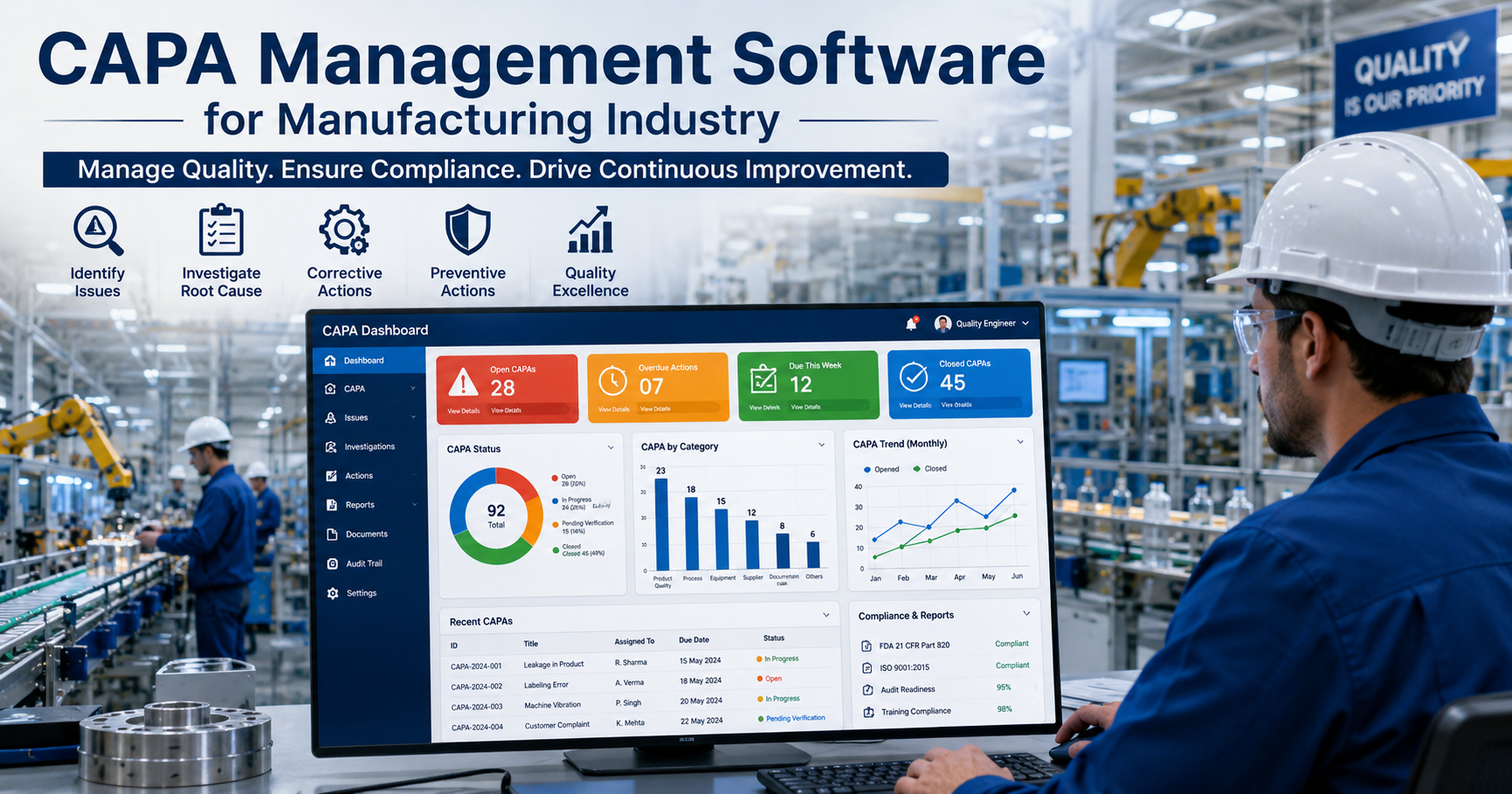
CAPA Management Software simplifies the entire process by bringing every activity into one centralized digital system. It allows quality teams to investigate problems, assign responsibilities, monitor progress, document evidence, and generate reports without losing important information.
In this comprehensive guide, you’ll learn what CAPA Management Software is, how it works, why manufacturers need it, its key features, benefits, implementation tips, and best practices for achieving continuous quality improvement.
Read More: 10 Amazing Ayurvedic Skin Care Products for Naturally
What Is CAPA Management Software?
CAPA Management Software is a digital quality management solution that helps manufacturers manage Corrective Actions and Preventive Actions through a standardized workflow.
Instead of keeping documents in different folders or spreadsheets, the software stores every CAPA record in one secure platform.
It helps organizations:
- Identify quality problems
- Investigate root causes
- Assign corrective actions
- Prevent recurring issues
- Track completion status
- Maintain regulatory documentation
- Improve product quality
The software also provides complete visibility into ongoing CAPA activities, making audits much easier.
Understanding CAPA: Corrective Action vs Preventive Action
Many beginners confuse corrective action and preventive action. Although they are closely related, they serve different purposes.
Corrective Action
Corrective action focuses on solving an existing problem.
It answers questions like:
- Why did the issue happen?
- How can we fix it?
- How can we make sure it doesn’t happen again?
Example
A cosmetic manufacturer receives multiple customer complaints that a face cream package is leaking.
After investigation, the quality team discovers that one packaging machine was applying insufficient sealing pressure.
The company:
- Repairs the machine
- Updates maintenance schedules
- Retrains machine operators
- Monitors future production
These steps are corrective actions.
Read More:Which Hair Mask is The Best for Frizzy and Dry
Preventive Action
Preventive action focuses on stopping problems before they occur.
Instead of waiting for a failure, manufacturers identify potential risks and eliminate them early.
Example
A pharmaceutical company notices that one production line shows increasing equipment vibration.
Although no product defects have occurred yet, maintenance predicts possible machine failure.
The company:
- Replaces worn components
- Updates inspection frequency
- Introduces predictive maintenance
This prevents future production problems.
Why CAPA Is Important in Manufacturing
Manufacturing processes involve many interconnected activities.
A problem in one department can affect:
- Raw materials
- Production
- Packaging
- Warehousing
- Shipping
- Customer satisfaction
- Regulatory compliance
Without an effective CAPA process, the same problems continue to occur.
For example:
A food manufacturer repeatedly experiences labeling errors.
Employees manually replace incorrect labels each time without investigating the root cause.
Months later, the issue continues because the real cause—a barcode software configuration problem—was never addressed.
A proper CAPA system ensures the company solves the actual cause rather than only treating the symptoms.
Read More: Best Serum for Pigmentation and Dark Spots: A Complete Guide
Industries That Commonly Use CAPA Management Software
CAPA software is widely used in industries where product quality, safety, and compliance are critical.
These industries include:
Pharmaceutical Manufacturing
Drug manufacturers use CAPA to investigate deviations, laboratory errors, validation failures, and customer complaints.
Medical Device Manufacturing
Medical device companies rely on CAPA to comply with strict regulatory requirements while improving product safety.
Cosmetic Manufacturing
Cosmetic manufacturers use CAPA to investigate contamination, packaging defects, formulation inconsistencies, and customer complaints.
Food and Beverage Industry
Food manufacturers use CAPA to prevent contamination, labeling mistakes, and food safety incidents.
Automotive Manufacturing
Automotive companies investigate supplier issues, production defects, warranty claims, and process failures.
Electronics Manufacturing
Electronics manufacturers use CAPA to reduce component failures, assembly defects, and quality deviations.
Common Problems Solved by CAPA Software
Manufacturers face many recurring quality issues.
CAPA software helps resolve problems such as:
- Product defects
- Customer complaints
- Supplier quality issues
- Production deviations
- Equipment failures
- Non-conformance reports
- Audit findings
- Inspection failures
- Process inconsistencies
- Documentation errors
- Packaging defects
- Employee training gaps
Instead of handling each issue separately, CAPA software links investigations, actions, approvals, and verification into one organized workflow.
Read More: Why Is pH Important in Skincare Products
Traditional CAPA Management vs Digital CAPA Software
Many companies still rely on paper files or spreadsheets for CAPA management. While this approach may seem simple initially, it often creates challenges as the organization grows.
| Traditional Method | CAPA Management Software |
|---|---|
| Paper-based records | Digital centralized records |
| Manual approvals | Automated approval workflows |
| Difficult tracking | Real-time status tracking |
| Higher risk of missed deadlines | Automated reminders and notifications |
| Limited reporting | Instant dashboards and analytics |
| Time-consuming audits | Audit-ready documentation |
| Greater chance of human error | Standardized and controlled processes |
As manufacturing operations become more complex, digital CAPA systems help improve consistency, accountability, and overall quality performance.
How the CAPA Process Works: Step-by-Step
A successful CAPA process follows a structured workflow that ensures every issue is investigated thoroughly and resolved effectively. While different organizations may customize the process, most CAPA Management Software follows these key steps.
1. Identify the Problem
The CAPA process begins when a quality issue is detected. The problem may be discovered during production, inspections, internal audits, customer feedback, supplier evaluations, or regulatory inspections.
Common triggers include:
- Product defects
- Customer complaints
- Failed quality inspections
- Equipment malfunctions
- Process deviations
- Supplier quality issues
- Laboratory test failures
- Internal or external audit findings
Example:
A cosmetics manufacturer notices that several batches of face lotion have an unusual texture during quality inspection. Instead of simply rejecting the affected batches, the quality team initiates a CAPA investigation to determine the underlying cause.
2. Record the Issue
Once the issue is identified, it is documented in the CAPA Management Software.
The software captures important information such as:
- CAPA identification number
- Date of issue
- Product name
- Batch or lot number
- Department involved
- Description of the problem
- Person reporting the issue
- Supporting documents or images
Digital documentation ensures that all information is stored securely and can be accessed whenever needed.
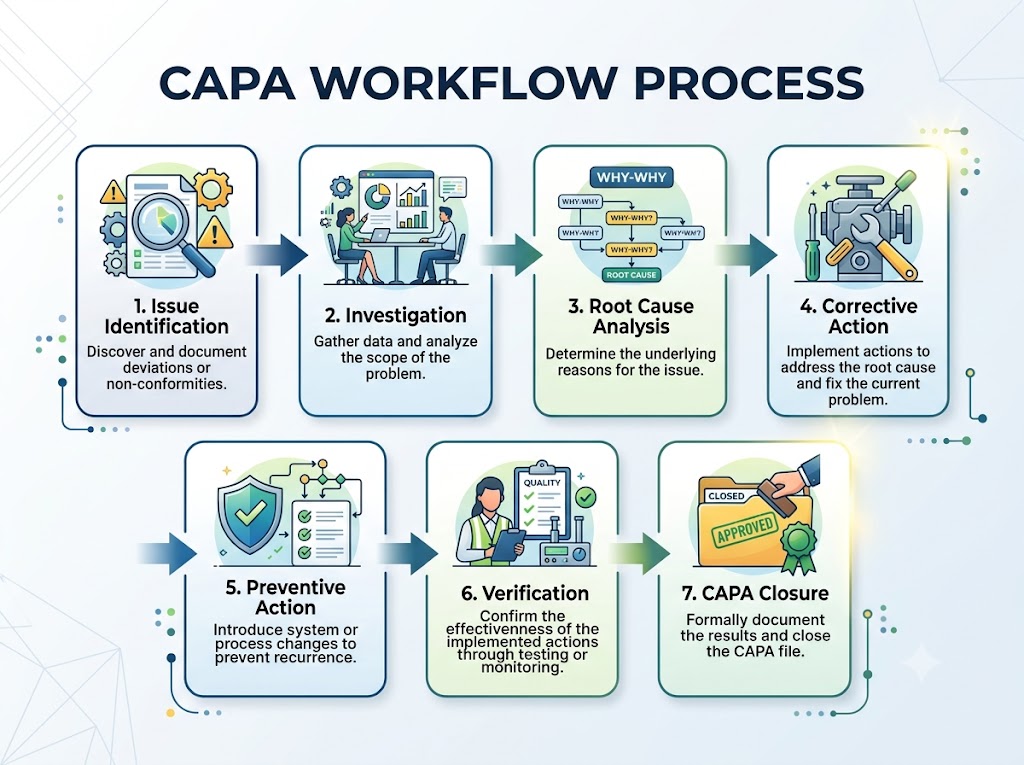
3. Assess the Risk
Not every quality issue carries the same level of risk. Some may have little impact, while others could affect customer safety or regulatory compliance.
The quality team evaluates factors such as:
- Severity of the issue
- Likelihood of recurrence
- Impact on product quality
- Risk to customers
- Business impact
- Regulatory consequences
The software can prioritize CAPAs based on risk, helping organizations focus first on the most critical problems.
Example:
A spelling mistake on a shipping carton may require correction but poses a low risk. In contrast, incorrect dosage information on a pharmaceutical label is a high-risk issue that demands immediate action.
Root Cause Analysis: Finding the Real Problem
One of the biggest advantages of CAPA is that it focuses on identifying the root cause rather than just fixing the visible problem.
Without root cause analysis, organizations may repeatedly face the same issues because only the symptoms are addressed.
Why Root Cause Analysis Matters
Imagine a manufacturing machine suddenly stops working.
Replacing a damaged part may restart production, but if the real cause was poor maintenance practices, the problem is likely to happen again.
Root cause analysis helps eliminate the source of the issue instead of repeatedly treating its effects.
Common Root Cause Analysis Methods
The 5 Whys Technique
The “5 Whys” method involves asking “Why?” repeatedly until the underlying cause is identified.
Example:
Problem: Cosmetic bottles are leaking.
Why?
The caps are not sealing properly.
Why?
The capping machine applies insufficient torque.
Why?
The torque settings changed unexpectedly.
Why?
The machine was not calibrated after maintenance.
Why?
The maintenance checklist did not include calibration verification.
Root Cause: An incomplete maintenance procedure.
The corrective action should address the maintenance process rather than simply tightening bottle caps.
Fishbone Diagram (Cause-and-Effect Diagram)
This method categorizes possible causes into areas such as:
- People
- Machines
- Materials
- Methods
- Environment
- Measurement
It helps teams explore every possible contributing factor before reaching conclusions.
Read More: Top 10 Natural Colours for Lipstick (Naturally Derived Pigments Guide)
Pareto Analysis
Pareto Analysis identifies which problems occur most frequently.
It follows the 80/20 principle, suggesting that a small number of causes often account for most quality issues.
By focusing on these major causes, manufacturers can achieve significant improvements.
Creating Corrective Actions
Once the root cause is confirmed, the organization develops corrective actions to eliminate the existing problem.
Corrective actions may include:
- Updating manufacturing procedures
- Repairing equipment
- Changing suppliers
- Improving employee training
- Revising quality standards
- Modifying production processes
- Updating software settings
- Introducing additional inspections
Each action is assigned to a responsible employee with a defined completion date.
CAPA Management Software automatically tracks progress and sends reminders until every action is completed.
Developing Preventive Actions
Preventive actions are designed to stop similar issues from happening in the future.
Examples include:
- Preventive maintenance schedules
- Enhanced employee training
- Process standardization
- Supplier qualification improvements
- Updated inspection plans
- Automated quality monitoring
- Better document control
- Risk-based quality reviews
Preventive actions contribute to long-term operational excellence and reduce future quality incidents.
Verification of Effectiveness
Completing corrective actions is not the final step.
Organizations must verify whether the actions actually solved the problem.
Verification may include:
- Reviewing production data
- Conducting follow-up inspections
- Monitoring customer complaints
- Performing internal audits
- Comparing defect rates before and after implementation
Example:
A food manufacturer changes its packaging process after recurring seal failures.
Over the next three months, quality reports show that seal defects have dropped from 3% to 0.1%.
This confirms that the corrective action was effective.
CAPA Closure
After successful verification, the CAPA can be formally closed.
The software records:
- Investigation summary
- Root cause
- Corrective actions completed
- Preventive actions implemented
- Verification results
- Final approvals
- Closure date
These records remain available for future audits and quality reviews.
Key Features of CAPA Management Software
Modern CAPA software offers much more than simple issue tracking. It serves as a central platform for managing quality improvement across the organization.
Centralized CAPA Database
All CAPA records are stored in one secure location, making it easy to search, review, and retrieve information during audits.
Automated Workflow
Instead of relying on emails or manual follow-ups, the software automatically routes tasks to the appropriate employees.
Benefits include:
- Faster approvals
- Clear responsibilities
- Reduced delays
- Consistent processes
Task Management
Each CAPA can be divided into smaller tasks with:
- Assigned owners
- Due dates
- Progress tracking
- Completion status
Managers always know who is responsible for each activity.
Document Management
CAPA software securely stores important files such as:
- Investigation reports
- Photographs
- SOPs
- Test results
- Audit reports
- Training records
- Supporting evidence
This eliminates the need to search through paper files during inspections.
Notifications and Reminders
Automated alerts help ensure that deadlines are not missed.
Users receive notifications for:
- New CAPA assignments
- Upcoming due dates
- Pending approvals
- Overdue tasks
- CAPA closure requests
These reminders improve accountability and keep projects moving efficiently.
Dashboards and Reporting
Managers can monitor quality performance through real-time dashboards that display:
- Open CAPAs
- Closed CAPAs
- Overdue actions
- Department-wise trends
- Root cause patterns
- Recurring issues
- Completion rates
These insights help leadership make informed decisions and identify opportunities for continuous improvement.
Benefits of CAPA Management Software for the Manufacturing Industry
Implementing CAPA Management Software is more than replacing paper records with digital files. It transforms how manufacturers identify, investigate, and prevent quality issues. A well-designed CAPA system helps organizations improve efficiency, strengthen compliance, and build a culture of continuous improvement.
Below are the major benefits manufacturers can expect.
1. Improves Product Quality
One of the biggest advantages of CAPA Management Software is its ability to improve product quality over time.
Instead of repeatedly fixing the same issues, the software helps teams identify recurring problems and eliminate their root causes. As a result, defects decrease, processes become more consistent, and customers receive better-quality products.
Example:
An electronics manufacturer notices repeated soldering defects on a circuit board. After investigating the root cause, the company discovers that temperature settings on one machine are incorrect. Once the settings are corrected and operators receive additional training, the defect rate drops significantly.
2. Reduces Recurring Problems
Many manufacturing issues return because only the visible symptoms are addressed.
CAPA software encourages structured investigations that focus on the actual cause of the problem. This reduces repeat incidents and saves valuable production time.
Instead of solving the same issue every month, organizations can implement permanent solutions that improve long-term performance.
3. Strengthens Regulatory Compliance
Manufacturers operating in regulated industries must maintain detailed records of investigations, corrective actions, approvals, and verification activities.
CAPA Management Software automatically documents every stage of the process, making it easier to demonstrate compliance during inspections and audits.
Well-maintained records also reduce the stress associated with regulatory reviews.
4. Speeds Up Issue Resolution
When quality issues are managed through emails or spreadsheets, important tasks can easily be delayed or overlooked.
CAPA software improves response times by:
- Automatically assigning tasks
- Sending deadline reminders
- Tracking progress in real time
- Escalating overdue actions
- Keeping all stakeholders informed
This structured workflow helps teams resolve problems much faster.
5. Improves Team Collaboration
Quality issues often involve multiple departments, including production, quality assurance, engineering, maintenance, purchasing, and management.
CAPA software allows every department to work within the same platform.
Everyone can:
- View investigation progress
- Upload supporting documents
- Provide comments
- Approve actions
- Monitor deadlines
This improves communication and reduces misunderstandings.
6. Enhances Decision-Making with Data
Modern CAPA systems generate valuable reports and dashboards that help managers identify patterns.
For example, reports may show:
- The most common customer complaints
- Departments with frequent non-conformities
- Equipment causing repeated failures
- Supplier-related quality issues
- Average CAPA completion time
These insights support better planning and continuous improvement initiatives.
7. Reduces Costs
Poor quality can be expensive.
Costs associated with recurring defects may include:
- Product recalls
- Rework
- Scrap
- Customer compensation
- Production downtime
- Warranty claims
- Regulatory penalties
By preventing recurring issues, CAPA software helps organizations reduce these unnecessary expenses and improve profitability.
Regulatory Compliance and CAPA Management
Many manufacturing industries must comply with strict quality regulations. CAPA is a key requirement in several international quality standards because it demonstrates an organization’s commitment to identifying, correcting, and preventing quality problems.
A digital CAPA system makes compliance easier by providing standardized workflows, secure documentation, and complete audit trails.
Common Standards That Require CAPA
- ISO 9001 – Quality Management Systems
- ISO 13485 – Medical Device Quality Management
- Good Manufacturing Practices (GMP) for pharmaceuticals, cosmetics, and food
- FDA 21 CFR Part 820 – Quality System Regulation for medical devices
- FDA 21 CFR Part 11 – Electronic records and electronic signatures
- HACCP – Food safety management
- IATF 16949 – Automotive Quality Management Systems
Although the specific requirements vary, all of these standards emphasize proper documentation, investigation of non-conformities, implementation of corrective actions, and verification that those actions are effective.
How CAPA Software Supports Regulatory Audits
Regulatory inspections often require organizations to present evidence showing how quality issues were managed.
Without a centralized system, gathering this information can take days.
With CAPA Management Software, auditors can quickly review:
- CAPA records
- Investigation reports
- Root cause analysis
- Assigned responsibilities
- Approval history
- Supporting documents
- Action completion dates
- Verification records
- Audit trails
Having complete and organized records creates confidence during inspections and reduces the time spent preparing for audits.
Integrating CAPA Software with Quality Management Systems (QMS)
CAPA does not work in isolation. It becomes even more effective when connected with other quality processes.
Many organizations integrate CAPA Management Software with their broader Quality Management System (QMS), allowing information to flow seamlessly between different quality functions.
Common integrations include:
Document Control
Standard Operating Procedures (SOPs), work instructions, and quality manuals can be updated automatically after a CAPA is completed.
Non-Conformance Management
When a non-conforming product is detected, a CAPA can be created directly from the non-conformance record.
Complaint Management
Customer complaints can trigger CAPA investigations whenever recurring issues are identified.
Audit Management
Internal and external audit findings can automatically generate CAPA records, ensuring that observations are addressed systematically.
Supplier Quality Management
Supplier-related defects can be linked to CAPA investigations, helping organizations improve supplier performance over time.
Training Management
If an investigation identifies inadequate employee training as the root cause, the system can assign mandatory training before closing the CAPA.
Best Practices for Implementing CAPA Management Software
A successful CAPA program depends not only on the software but also on how it is implemented and used. Following these best practices can help organizations achieve better results.
Gain Management Support
Leadership should actively support CAPA initiatives by providing resources, encouraging participation, and reviewing quality performance regularly.
When management prioritizes quality, employees are more likely to follow CAPA procedures consistently.
Standardize CAPA Workflows
Every department should follow the same investigation and approval process.
Standardized workflows help maintain consistency and reduce confusion across the organization.
Train Employees Thoroughly
Employees should understand:
- When to initiate a CAPA
- How to document issues
- How to perform root cause analysis
- How to complete assigned tasks
- Why CAPA is important
Regular refresher training helps maintain compliance and improves the quality of investigations.
Encourage Accurate Documentation
CAPA records should be:
- Clear
- Complete
- Objective
- Timely
- Evidence-based
Avoid vague descriptions. Good documentation makes investigations easier and supports regulatory compliance.
Monitor Performance Metrics
Organizations should regularly review Key Performance Indicators (KPIs), such as:
- Number of open CAPAs
- Average closure time
- Overdue CAPAs
- Recurrence rate of issues
- Root cause trends
- Department-wise performance
- Corrective action effectiveness
Tracking these metrics helps identify opportunities for continuous improvement.
Common Challenges During CAPA Implementation
Even with the right software, organizations may face implementation challenges. Recognizing these issues early can improve adoption and long-term success.
Employee Resistance
Some employees may hesitate to adopt a new digital system.
Solution: Provide practical training, explain the benefits, and involve users during implementation.
Incomplete Investigations
Teams sometimes rush investigations and identify only surface-level causes.
Solution: Use structured root cause analysis methods such as the 5 Whys or Fishbone Diagram before approving corrective actions.
Poor Documentation
Missing information can delay audits and reduce the effectiveness of CAPA.
Solution: Use standardized templates, mandatory fields, and review workflows within the software.
Missed Deadlines
Manual follow-ups often result in overdue actions.
Solution: Enable automated reminders, escalation rules, and dashboard monitoring to keep CAPAs on track.
Future Trends in CAPA Management Software
As manufacturing becomes more digital, CAPA Management Software continues to evolve with new technologies that make quality management faster, smarter, and more proactive.
Artificial Intelligence (AI)
AI-powered CAPA systems can analyze large volumes of quality data to identify patterns that humans might overlook.
For example, AI can:
- Detect recurring defect trends
- Recommend possible root causes
- Predict high-risk production areas
- Suggest corrective actions based on historical data
This helps quality teams investigate issues more efficiently and make better-informed decisions.
Predictive Analytics
Traditional CAPA focuses on solving existing problems. Predictive analytics goes a step further by identifying potential risks before they lead to defects.
By analyzing production data, equipment performance, and inspection results, predictive tools can alert manufacturers to possible quality issues early. This allows preventive actions to be taken before products are affected.
Cloud-Based CAPA Solutions
Cloud technology is becoming the preferred choice for many manufacturers because it offers flexibility and accessibility.
Benefits include:
- Access from multiple locations
- Automatic software updates
- Secure data backups
- Easier collaboration across teams
- Reduced IT infrastructure costs
- Faster deployment
Cloud-based CAPA systems are especially valuable for organizations with multiple manufacturing sites or remote quality teams.
Mobile Accessibility
Many modern CAPA platforms include mobile applications that allow employees to:
- Report quality issues instantly
- Upload photos from the production floor
- Approve CAPAs remotely
- Track assigned tasks
- Receive real-time notifications
This reduces delays and improves responsiveness.
Advanced Dashboards and Business Intelligence
Interactive dashboards help management monitor quality performance in real time.
Organizations can quickly identify:
- Recurring quality trends
- High-risk departments
- Delayed CAPAs
- Supplier performance
- Customer complaint patterns
- Improvement opportunities
These insights support continuous improvement and strategic planning.
Choosing the Right CAPA Management Software
Selecting the right solution depends on your organization’s size, industry, and regulatory requirements.
When evaluating software, consider the following factors:
Ease of Use
A simple and intuitive interface encourages employee adoption and reduces training time.
Workflow Customization
The software should allow organizations to configure workflows that match their internal quality processes and approval structures.
Regulatory Support
Choose a solution that supports the regulations and quality standards relevant to your industry.
Integration Capabilities
The software should integrate easily with:
- ERP systems
- Quality Management Systems (QMS)
- Document management platforms
- Audit management tools
- Supplier management systems
Reporting and Analytics
Look for software that provides customizable dashboards and detailed reports to support continuous improvement.
Security
Quality records often contain sensitive business information. Ensure the software provides:
- User access controls
- Data encryption
- Audit trails
- Secure backups
Vendor Support
Reliable customer support, training resources, and regular software updates are important for long-term success.
Real-World Example
Imagine a company that manufactures cosmetic creams and lotions.
The quality team begins receiving an increasing number of customer complaints about damaged product containers. Instead of replacing the affected products one by one, the company opens a CAPA investigation.
Using the CAPA Management Software, the team:
- Records each complaint in the system.
- Reviews production and packaging data.
- Performs a root cause analysis.
- Discovers that one packaging machine applies inconsistent sealing pressure.
- Repairs and recalibrates the equipment.
- Updates the preventive maintenance schedule.
- Retrains packaging operators.
- Monitors production for the next three months.
The results are clear:
- Packaging defects decrease significantly.
- Customer complaints are reduced.
- Product waste declines.
- Audit records remain complete and organized.
- Overall customer satisfaction improves.
This example shows how CAPA software helps solve the underlying cause of a problem instead of repeatedly addressing its symptoms.
Conclusion
Quality is one of the most important factors in manufacturing success. Whether a company produces pharmaceuticals, cosmetics, food products, medical devices, automotive parts, or electronics, maintaining consistent quality requires a structured approach to identifying and resolving issues.
CAPA Management Software provides that structure by helping organizations document problems, investigate root causes, implement corrective and preventive actions, verify effectiveness, and maintain complete regulatory records.
Beyond supporting compliance, CAPA software promotes continuous improvement by reducing recurring defects, improving collaboration, enhancing decision-making, and strengthening customer confidence.
As manufacturing technologies continue to advance, modern CAPA solutions powered by artificial intelligence, predictive analytics, cloud computing, and real-time reporting will play an even greater role in helping organizations achieve operational excellence.
Investing in the right CAPA Management Software is not simply about meeting regulatory requirements—it is about building a culture of quality, accountability, and continuous improvement that supports long-term business success.
Frequently Asked Questions (FAQs)
1. What does CAPA stand for?
CAPA stands for Corrective and Preventive Action. It is a structured process used to identify quality issues, determine their root causes, implement corrective actions, and prevent similar problems from recurring.
2. Why is CAPA important in manufacturing?
CAPA helps manufacturers improve product quality, reduce recurring defects, maintain regulatory compliance, and strengthen customer satisfaction through systematic problem-solving.
3. Which industries commonly use CAPA Management Software?
CAPA software is widely used in pharmaceutical, medical device, cosmetic, food and beverage, automotive, electronics, aerospace, and chemical manufacturing industries.
4. What is the difference between corrective action and preventive action?
Corrective action resolves an existing problem by eliminating its root cause, while preventive action focuses on identifying and addressing potential risks before they result in quality issues.
5. Can small manufacturers benefit from CAPA software?
Yes. Even small manufacturers can improve quality management, organize documentation, reduce manual work, and prepare for future growth by using CAPA software.
6. How does CAPA software support regulatory compliance?
It maintains complete digital records of investigations, approvals, corrective actions, preventive actions, verification activities, and audit trails, making inspections and audits more efficient.
7. What features should I look for in CAPA Management Software?
Important features include workflow automation, root cause analysis tools, document management, dashboards, reporting, task tracking, audit trails, notifications, and integration with other quality systems.
8. Can CAPA software integrate with ERP and QMS platforms?
Yes. Most modern CAPA solutions integrate with Enterprise Resource Planning (ERP) systems, Quality Management Systems (QMS), document control, complaint management, audit management, and supplier quality platforms.
9. How long does it take to implement CAPA Management Software?
Implementation time depends on the size of the organization, workflow complexity, system integrations, and employee training. Small implementations may take a few weeks, while larger enterprise projects can take several months.
10. What is the biggest benefit of CAPA Management Software?
The greatest benefit is its ability to eliminate recurring quality issues through structured investigations and continuous improvement, leading to better products, stronger compliance, and higher customer satisfaction.